A few years ago I decided I wanted to try my hand at iOS app development. In January 2012 I started working my way through the excellent iOS Apprentice tutorial series, which I completed three months later. Straight afterwards I started work on my first app, named Daily Offers. After more hard work than I’d ever imagined would be necessary, Daily Offers 1.0 finally went on sale on the UK App Store on 4 February 2013 and I achieved what I’d set out to do. Since then I have released eleven updates to the app as well as a version tailored for the Australian App Store named Grocery Offers. I have learned quite a lot about iOS app development, some of which I think is worth sharing.
When you submit an app to the App Store you have to choose a so-called bundle identifier, which should use a reverse Internet domain-style name. For Daily Offers I chose com.sideprojectsoftware as that’s what it was; a project on the side of my day job. All of which leads me to introduce my new iOS app development blog at Side Project Software.
Every year the same films tend to be shown on British terrestrial television during the Christmas holidays. You know the ones: The Wizard of Oz, The Great Escape, The Towering Inferno, The Italian Job and Willy Wonka & the Chocolate Factory amongst others. I guess they’re shown because they’re family favourites and indeed I like all of those films. I mention this because Steve Jobs’s incredible run of keynote presentations introducing new products in recent years somehow made me feel like I was Charlie Bucket being given a tour of Willy Wonka’s chocolate factory and the delights within. The similarities don’t end there: Wonka was a charismatic leader and the chocolate factory a secretive place that rarely opened its doors to outsiders.
I didn’t set out to become someone who considered Apple events to be so compelling, but it’s been such an incredible run that the best way I can
think to describe it is like watching an amazing sports person pull off a once in a lifetime feat. With Steve Jobs at the helm it just kept getting
better and better, one brilliant keynote and product announcement after another. A juggernaut that saw Apple go from the verge of oblivion to financially the most valuable company in the world.
I never really imagined that I’d get to own an Apple computer, because the idea of owning a Macintosh in the 1980s when a Sinclair ZX Spectrum was my home computer was preposterious—they were just far too expensive. The same held true when I got into the PC in the early 1990s. I loved the industrial design of the Mac and its integrated GUI was obviously superior to the MS-DOS and Windows combination, but at that time in my life I couldn’t afford one. I’d read plenty about Steve Jobs and the founding of the company and I was vaguely aware of what it was up to and its products, but it wasn’t then part of my life. That would have to wait a few years until I got a job and starting earning some disposable income.
Like many millions of people, my route into Apple product ownership was the iPod. I bought one of the fourth generation hard drive and click wheel
ones in 2004. At that time the iPod range had only just diversified into the wildly successful and surprisingly short-lived iPod Mini. I still
have that white and chrome iPod and it still works perfectly. From there, I bought laptops and a desktop—leaving behind the home PC forever—and an iPhone and most recently an iPad. I didn’t intend to end up with so much Apple kit, but I use and treasure all of it.
It strikes me that Steve Jobs was all about removing things, both figuratively and literally. With the Apple II he removed the prerequisite
that you had to be useful with a soldering iron to own a personal computer. With the original Macintosh you no longer had to remember a list of obscure commands to use a computer. With the iPod, you didn’t have to carefully trim down your playlists so they’d fit on a memory card or deal with temperamental syncing software (both problems my pre-iPod Diamond Rio MP3 player had). With the iMac, you no longer needed to have a separate bulky
system unit cluttering up your desk. With the iPhone and iPad he removed the stylus that got in the way between you and the computer, and in doing
so created a much more intimate and immersive experience. As a leader he removed the barriers to those under him doing the best work of their lives.
Steve Jobs wasn’t God and he certainly wasn’t a saint. We’ve all read the stories about how demanding he could be to work for and how ruthless a businessman he was. The question of his apparent lack of philanthrophy also comes up regularly. However, we’ve also all read the stories about how inspiring he was to work for, pushing those who worked for him to not be satisfied with just good enough and to do insanely great work. Those stories put me in mind of a special forces sergeant, pushing recruits to their breaking point and beyond and getting away with it because the recruits want to earn his respect. Wouldn’t it be great to work with somebody so charismatic who could see your true potential and push you to reach it? I think so. I don’t think Steve Jobs was a mean man because there are many examples online of his kind and human side. He was also unique amongst his peer CEOs in regularly reaching out directly via his famously pithy emails—through the layers of corporate protection he himself instigated—to those who bought his products.
Earlier this week I was stood at a bus station and there was a lady stood next to me who I’d estimate was in her late sixties. She was holding an
iPhone 4 in her hand and prodding the screen with her finger. Curious, I sneaked a look to see what app she was using. At first I thought it was
Maps, but then I realised that she was actually playing Sim City. I shouldn’t make assumptions based on appearances and age/gender stereotypes,
but in all honesty I think it’s unlikely that she was a geek pensioner. That’s Steve Jobs’s legacy right there: an elderly lady enjoying playing a
game on a handheld computer. He really did deliver the computer for the rest of us and whether directly or through Apple’s influence on
competitors, he played a massive part in making computing ubiqitous and more accessible to all.
I feel very sad that Steve’s life was tragically cut short by cancer at the age of 56. It resonates with me personally because my own father’s life was
tragically cut short by cancer at the age of 64. My thoughts in particular are with his family who have lost a husband and a father. The rest of us
have merely lost a creative genius and an industry titan. All of us who appreciated Steve Jobs and the impact he made on our lives should take some
comfort from knowing that he packed an incredible amount into his years with us and I feel lucky that I was alive to see it happen. There will
never be another quite like him.
I was never one of those children who was steered in the direction of learning a musical instrument, probably because neither of my parents ever exhibited any musical ability. Which is being truthful rather than unkind. Plus we weren’t middle class enough to have a piano.
Music wasn’t one of my favourite lessons at school, seeming mainly to consist of playing scales on a glockenspiel. Then one day a change of music teacher ushered in a new regime and the music practice rooms acquired little Yamaha mini-key electronic keyboards, with the result that I got interested in playing music as well as listening to it. I used to relish my time on those keyboards, messing around with the different preset sounds you could get out of the primitive FM synthesizer.
For three years afterwards I asked for increasingly sophisticated Yamaha PortaSound keyboards every Christmas. I taught myself to play after a fashion from those “learn to play the keyboard books” that came with an audio cassette featuring some earnest-sounding man cranking out standards such as “Sloop John B” on his Bontempi organ in the front room.
When Father Christmas brought me a Yamaha PSS-480, I finally had access to a primitive sequencer and a programmable two-operator FM synthesizer—effectively a third of a DX7, synth nerds!—and after a while I took the next logical step and started to write my own songs.
Fast forward a few years and I’d amassed quite the collection of my own material, which existed as atrocious quality home cassette recordings, scribbled down chords and lyrics and even hand-written sheet music if I thought one of my songs was particularly worthy of preservation.
When I entered the world of work and saved up some money, I bought the then-new Yamaha W7 synthesizer workstation and some expensive Sennheiser headphones rather than going down the more obvious and practical route of learning to drive and buying a cheap second-hand car—no wonder I didn’t get the girls!
The day the W7 arrived was amazing—I couldn’t believe I now had a professional quality studio-in-a-box in my bedroom. I used to spend hours on the thing, laboriously programming in the songs I’d written and saving the results using the built-in 3½ inch disk drive (more on that later). Incidentally, the decision to use headphones with the W7 wasn’t born out of consideration for the neighbours; it was simply because I couldn’t afford an amplifier and monitor speakers.
Unfortunately, the early model Yamaha W7s shipped with an unreliable disk drive and to cut a long story short, the drive became increasingly unreliable which meant that I couldn’t load or save my creative endeavours, rendering the W7 effectively useless. Finally, to top it all off the headphones stopped working as well.
I was devastated, but was also getting increasingly distracted away from making music by the lure of the PC and the world of computer programming. I still have my W7 in storage i.e. taking up room at my mother’s house. One day I will get around to sending it off somewhere to be repaired, no doubt at great personal expense.
I didn’t really do anything with music for the next few years until I bought my first Mac, discovered GarageBand and noodled around creating the odd track here and there. In iPad Too I raved about GarageBand for the iPad and now one month later, it’s the app I’ve spent the most time using, contradicting the notion that you can’t be creative with an iPad.
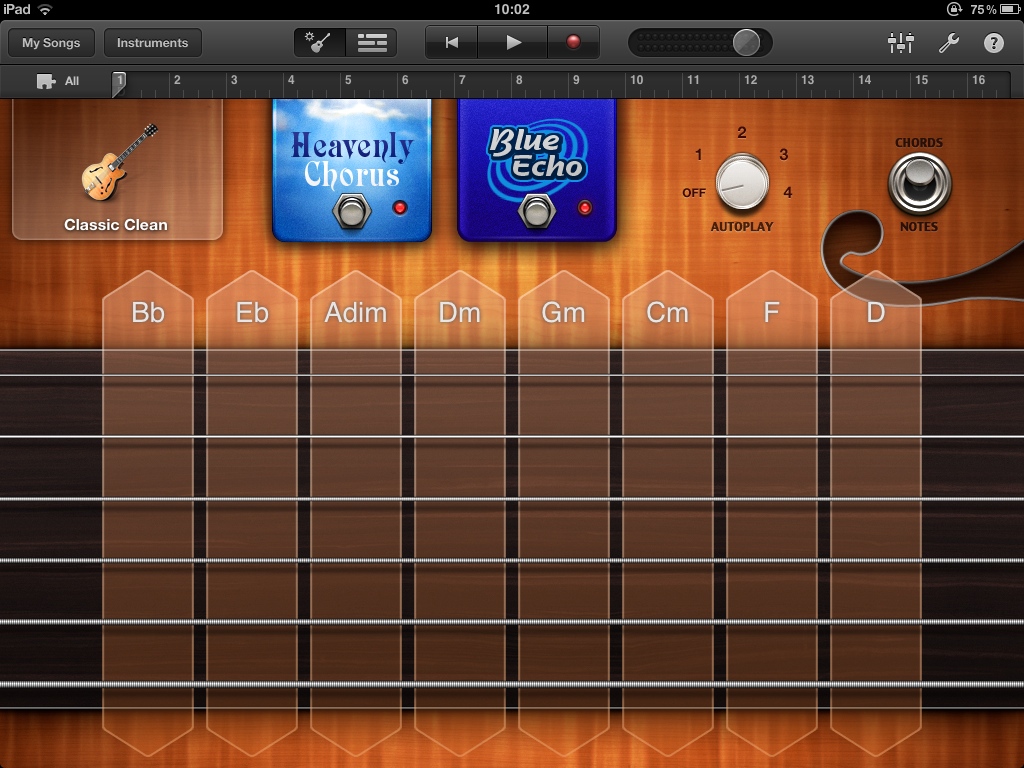
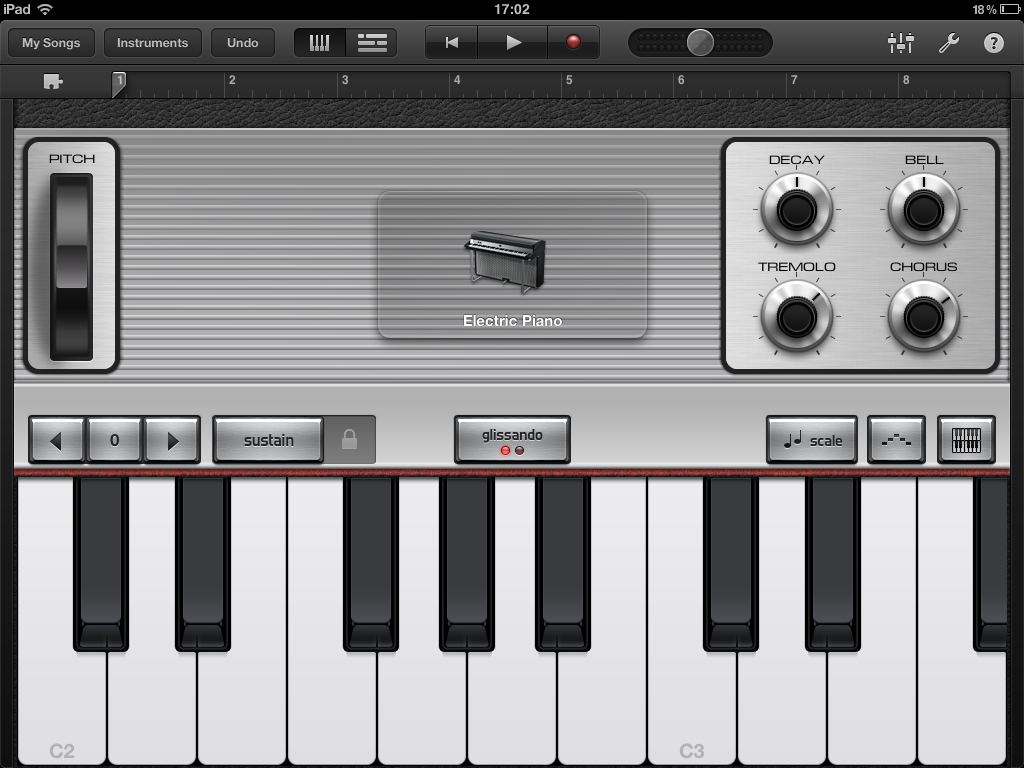
I wrote a new instrumental track that I named Rapture for no other reason than because I started work on it on the 21st of May, which is when some people predicted the world would end. I started the track by “strumming” the Smart Guitar and quickly came across a chord sequence I liked, then I laid down a rhythm track using the Smart Drums. I played the other instrumental parts conventionally using the on-screen keyboard instrument and spiced it up with a sprinkling of samples from GarageBand’s built-in collection.
Crank up the volume and take a listen by clicking the Play button below and let me know what you think!
When Apple announced the original iPad back in January last year I must admit that I was underwhelmed. Watching the keynote presentation afterwards a lot of people present in the room seemed to feel the same way, so subdued was the audience reaction. I’m not quite sure what we were expecting from the long rumoured and awaited Apple tablet, but it was surely more than the outsize iPod touch that Apple had apparently delivered.
Had the iPad launched in 2007 before the iPhone then it would have been a different story and I’m sure that the iPad would have received the same rapturous welcome that its smaller cellular brother received when first revealed—although I think the iPhone is all the more impressive for having the smaller form factor. It’s been said that the two devices came to market out of sequence and that the iPad was actually designed and developed first. Whether that’s true or not we don’t really know, but it certainly seems plausible.
Perhaps the biggest difficulty I had with the iPad was that I couldn’t quite see what it was for, in spite of Steve Jobs’s speech during the keynote saying that Apple had wrestled with, and solved, the core issue of their tablet’s raison d'être. There was a lot of emphasis placed on how people would “get it” when they actually held an iPad in their hands and used it. We were told that the whole was greater than the sum of its parts and that once we’d got to “hold the Web in our hands” the iPad as a proposition would make sense. This was marketing hype of course, but fast forward a few months to my first play with an iPad in an Apple store and I could see that there was actually some substance behind the hype.
I was already familiar with the joy of using Apple’s multi-touch interface from my iPod touch and the iPhone that later replaced it, but somehow the larger display added an extra dimension to the experience. There was something intangible but pleasurable about holding and interacting with a live Web page at near A4 size in your hand. It felt as if the whole touch experience had been designed for this screen size all along. It’s very hard to describe, which is perhaps Apple’s biggest challenge when it comes to pitching the iPad. Not too much of a challenge though, because the iPad has been a smash hit with consumers, surprising many so-called industry experts who wrote it off as a mere toy or luxurious frippery.
I didn’t buy a first generation iPad. Instead I vowed to wait three years for the third generation model, just as I had delayed my purchase of an iPhone until the 3GS came out in 2009. Having had the chance to try one, I knew that there was undoubtedly something special about it though and I found myself increasingly wanting one as I spent more time playing with it during idle moments in various stores. So I was even more interested than usual in what Apple had lined up for the launch of its successor last month.
It came as no surprise that the iPad 2 was thinner, lighter and faster, but it was the software on display that really shone, particularly GarageBand. I spent quite a while evaluating whether I should buy an iPad 2, and in all honesty I think my head said no but my heart said yes. My heart won out, I’d reached that tipping point and decided that I was going to buy one; waiting another year be damned!
Purchasing Pains
With the difficult decision of whether or not to having been made, it was time to move to the pleasurable and easy stage of actually buying the thing. At least that’s what I thought! Getting hold of an iPad 2 at the moment is not easy. These things are like gold dust. I quickly decided to go for the black 64 GB Wi-Fi model and ordered it online directly from Apple during the morning of the 26th of March—a day after it went on sale in the UK In hindsight I should have ordered it the day before, because the store quoted me a delivery time of three to four weeks, whereas on the morning of the launch it was a mere two to three weeks.
I went for the black variant because I’d heard that the screen reflections could be distracting with the newly-introduced white model. I went with the largest capacity because I didn’t want the hassle of having to manually manage the subset of content that I would sync to the device, as I have to with my 32 GB iPhone. Plus I wanted plenty of room for the future. If you look at the cost of flash memory storage and compare it to the price differential between each iPad capacity increment then it’s obvious that Apple are nickel-and-diming you as the Americans would say, but as the iPad RAM isn’t user upgradeable there’s not a lot you can do about it. Finally, I went for the Wi-Fi model rather than its 3G brother because at some point I might be in a position to get my iPad online using the Personal Hotspot feature on my next iPhone (dependent on the carrier cost, of course). Plus I shall mainly be using my iPad at home where a fast Wi-Fi connection is on tap.
Frustrated with the long delay until my online order was fulfilled, in the meantime I decided to chance my luck at buying a new iPad from an Apple retail store, with the intention of cancelling my online order if successful. With this in mind I ventured to my local Apple Store on the 1st of April, a Friday. Getting my hands on the demo iPad 2 and putting it through its paces confirmed that I’d made the right decision and now I really wanted one! Unfortunately the “Apple Genius” told me that the only way to get hold of a new iPad from them was to reserve online twenty four hours previously. I tried various other stores in the shopping centre but they all told me that iPad 2s were selling out as soon as they arrived.
I also tried the local Argos superstore, where their customer-facing computer told me that they were out of stock of iPad 2s, but helpfully suggested three nearby stores where I could reserve one. Amazed, I picked the nearest store to home and made a reservation. I went to the store the following morning to pick up my reservation, but immediately knew something was wrong when I entered my reservation number and it came up on screen that this iPad was discounted by £120! The Argos computer had helpfully reserved a black 64 GB Wi-Fi first generation iPad for me, leaving me to leave the store empty-handed and somewhat disheartened.
I knew that Apple’s online reservation system wasn’t available until nine o'clock every night and not being one to give up easily, that Saturday evening I tried to make a reservation. However, the site was unresponsive, both timing out and repeatedly losing my session. It was obviously getting hammered. As I was also off work the following Friday, I made a mental note to try to reserve an iPad the following Wednesday for pick up on the Friday. I also knew that iPad reservations became unavailable within minutes, so I’d have to be quick.
Wednesday evening came and I started to hit the Apple reservations site using both Safari and Chrome at ten to nine. To my amazement at 20:59 I broke through and was successfully able to reserve the model I wanted. I signed in with my Apple ID and got to the last step in the reservations wizard where it asked me which half hour time slot I wanted for collecting my iPad during…Thursday! Due to work commitments I was unable to re-arrange my leave for the next day, so much to my annoyance I had to abandon my reservation. I tried again the following evening, but perhaps unsurprisingly I wasn’t one of the lucky punters who was able to reserve an iPad that night.
I tried to make an online reservation again on the Friday evening but again without success, so I gave up at that point. Although I don’t generally give up easily, there does come a point with these things when you have to call it a day, accept that it’s just not happening and move on. I’d just have to wait for my online order to come through—it was only a few weeks, after all. Then something unexpected happened. I got an email from Apple on the 13th of April telling me that my iPad was shipping! I don’t know why I was so surprised because Apple have shipped things to me earlier than they said they would before.
iPad 2 World Tour
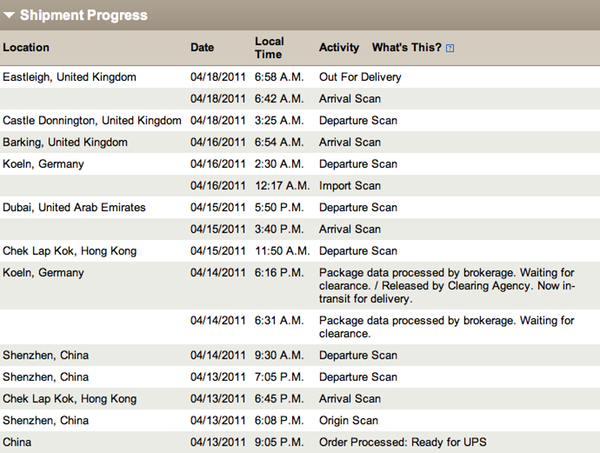
The acquire-an-iPad 2 game that I was embroiled in had now moved to the next level and it was time to play guess the delivery date! Fortunately I had the UPS tracking number on my side, so I was able to pinpoint my iPad’s whereabouts in some detail:
—I must admit that the frequent trips to Cologne nearly threw me off the scent until I came to the realisation that my package had never actually been to Germany and that it was actually some paperwork process that was happening there in parallel! My iPad 2 was finally delivered into my eager hands on the 18th of April. Somewhat spookily the UPS delivery man asked me if my package was an iPad 2 and when I confirmed this he said they were all they were delivering at the moment—in his words, loads of them. I guess when you have a van full of the things you soon get to recognise the parcels.
First Impressions
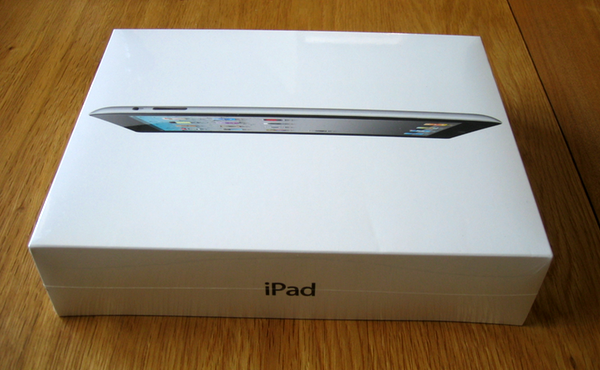
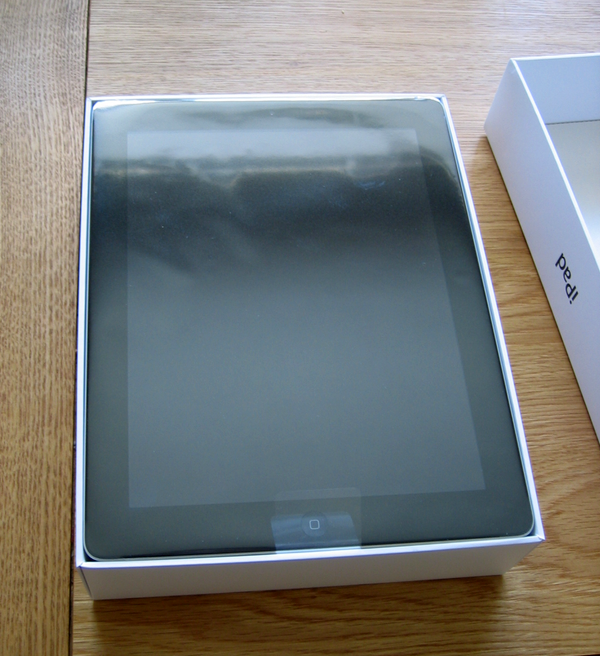
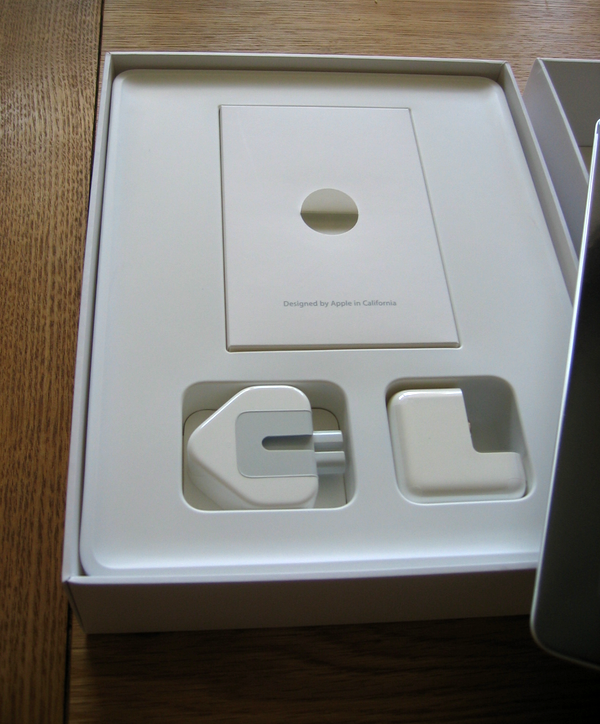
The iPad 2 comes packaged in the exquisite minimalist style that Apple has become famous for, although nowadays their packaging is less extravagant and much kinder to the environment than it used to be. Remove the snugly fitting box lid and the iPad is the first thing you see, covered in a protective, transparent film. Lift it up and move it aside for a moment if you can bring yourself to and there’s a white envelope with the usual “Designed by Apple in California” tag line printed on the front. This contains the sparse double-sided instruction sheet, the warranty information and the usual couple of Apple logo stickers. The only other bits you get in the box are the Apple dock cable and the power brick with its plug-in UK plug attachment.
I noticed immediately that the iPad doesn’t share the unfeasibly compact combination plug and power adapter that the iPhone uses. Be aware that you do need to charge the iPad using the electrical accessories it comes with because they’re rated at 10W to handle the increased power its capacious batteries need for optimum charging. I made the mistake of trying to use a standalone Apple USB power adapter I had to hand, with the result that the iPad was taking an age to charge. This turned out to be because the adapter I was using was only rated at 5W. Which also explains why the iPad doesn’t charge over USB whilst connected to a computer, or at least that’s not the case with my late-2006 vintage iMac.
The iPad 2 feels simply gorgeous in your hands. It’s usefully thinner than the original iPad—actually a third thinner, making it thinner than an iPhone 4—and is exactly the right size for a tablet. Count me in with the seven-inches-is-too-small-for-a-tablet naysayers. The perfect feel of the iPad in your hands is no co-incidence or one of life’s happy accidents. It’s down to Jony Ive’s design department experimenting with hundreds or perhaps even thousands of prototypes to arrive at the iPad form factor. This is evolutionary and iterative industrial design par excellence. Best of all, the new iPad is noticeably lighter than the original, which I always felt was on the heavy side. Certainly too heavy to comfortably hold in one hand. Expect future iPads to become lighter and perhaps thinner still, although I think the batteries are the main constraint here, comprising as they do most of the volume and bulk.
The iPad 2 has a different cross-sectional design from its predecessor. It’s lost the flat edges and has an iPod touch-like rear that curves upwards at the edges towards the screen at an angle approaching forty five degrees. One surprising consequence of this is that the vertical edge of the still-proprietary Apple dock cable doesn’t mate with the tapered aluminium edge of the iPad. Instead there’s a roughly triangular gap where the actual connector contacts are exposed side-on. It’s a little disconcerting the first time you hook the iPad up because it feels as if there’s not enough physical contact to hold the cable securely in place, but in practice it works fine.
You turn the iPad on using the button located in the customary top right location and it boots fairly quickly (about twenty seconds), certainly in less time than my iPhone. When the screen comes to life for the first time you’re struck by how crisp it is and how vivid the colours are. One of the considerations that gave me pause for thought before ordering an iPad 2 was the persistent rumours that a version equipped with Apple’s high-resolution Retina Display would be announced this year. Of course it’s only April so that still might happen, although driving a 2048 x 1536 pixel display whilst maintaining the iPad’s famous excellent battery life is quite the engineering challenge. Only time will tell whether Apple have already solved it, but in the meantime I can honestly say that the iPad 2’s display is fabulous, at least to my eyes. I can’t find fault with it.
The most disappointing part of the iPad 2 first run experience comes when it has finished booting and you are presented with a graphic telling you to sync with iTunes. By this point you just want to get on and explore your new toy, but instead you have to plug it in to your computer, register it with Apple (if you want to) and copy over any existing media files and applications you might have. In my case this was a time-consuming exercise, as my iTunes library contains over 3,200 tracks and I have gigabytes of videos—mainly from PeepCode—and numerous apps. It makes for a frustrating experience and this is an area where Android is ahead with its sign-in-to-Google-and-copy-account-data-from-The Cloud approach.
Clearly the iPad has to be populated with your media content at some point, but I would have liked the option to postpone this step until when I was ready to commit to the time involved. It was made even more irritating because I subsequently deleted all of my iPhone-only apps that had been automatically installed on the iPad, because running them in a small rectangle in the middle of the screen or in pixellated form at double the original resolution doesn’t appeal. Much has been written about the iPad’s dependence on being tethered to a computer, so I don’t intend to go into it here, but suffice to say it would give me pause for thought before recommending one to a non-computer owning relative unless I could perform that initial sync myself first, by which time the iPad wouldn’t be in a pristine and unopened condition. I believe that Apple will also go through it with you at their retail stores, but personally I wouldn’t want to do that given how busy and crowded they get. It’s nicer to make your setup choices in the comfort and relaxed atmosphere of your own home.
Now that you’ve finally got your iPad 2 up and running it’s time to get stuck in and start using it properly. One thing I’ve noticed is that the accelerometer is very sensitive, which means that the iPad will easily swap display orientation, sometimes when you don’t want it to. Fortunately in iOS 4.3 Apple reintroduced the ability to use the switch above the volume rocker to lock the current orientation, a feature they removed to much public outcry in iOS 4.2, when the switch suddenly changed to muting/unmuting the volume. Now there is a software setting to control its purpose, which is the ideal.
Talking of the Settings app, I must admit that I was initially puzzled to see the setting for selecting the current ringtone in there, carried straight over from the iPhone. I assumed that this must be a harmless—but untypical—mistake, but then my faith in Apple’s attention to detail was restored when I remembered that the iPad 2 can make FaceTime calls over a Wi-Fi connection, presumably therefore requiring a ringtone to draw attention to an incoming video call.
I hardly ever use my iPhone in landscape orientation but the iPad is a different matter. The on-screen keyboard’s keys feel the same size or perhaps even slightly larger than those on Apple’s current range of physical keyboards. This means that it’s possible to touch type after a fashion and to this end the virtual keyboard even has virtual bumps on the F and J keys! It’s a cute gimmick but obviously they don’t actually help you correctly locate your index fingers on the keys. The iPad’s screen has a pleasing plastic-like springiness to it when typing, which is an interesting achievement considering that it’s made from toughened glass.
Accessories
No iPad 2 is an island, so with that in mind I bought a couple of first party accessories, namely a polyurethane Smart Cover and the HDMI AV adapter. The Smart Cover is really a remarkably clever piece of engineering and rather than try to describe it to you, you really should watch Apple’s charming demo short to get the idea if you haven’t seen it already.
The Smart Cover does have a couple of slight problems though. Firstly, when closed it feels like it would benefit from having some magnets along the top and bottom edge or just a stronger magnet along the right-hand edge, because it is possible for the folds in the cover to bunch up a little. The other issue is that when folded into a prism to act as a stand, the microfibre cloth is on the outside and therefore in contact with whatever surface it’s resting on. This might be a problem if that surface is dirty, but really this is just nit-picking. Taken as a whole, the Smart Cover is an ingenious, intriguing and pleasing design and I bet that Apple are going to sell almost as many as the iPad 2 itself.
I must admit that the HDMI AV adapter was an impulse buy. My partner and I wanted to watch the First Orbit film that celebrates fifty years since Yuri Gagarin first orbited the Earth, but we didn’t fancy having to sit in front of the computer in order to watch the 100 minute film on YouTube. Armed with the AV adapter I can now stream the video to my iPad over Wi-Fi and we can watch it on our television in more comfortable surroundings. The iPad display mirroring over HDMI works exactly as you’d expect and the content looks great on the bigger screen.
GarageBand
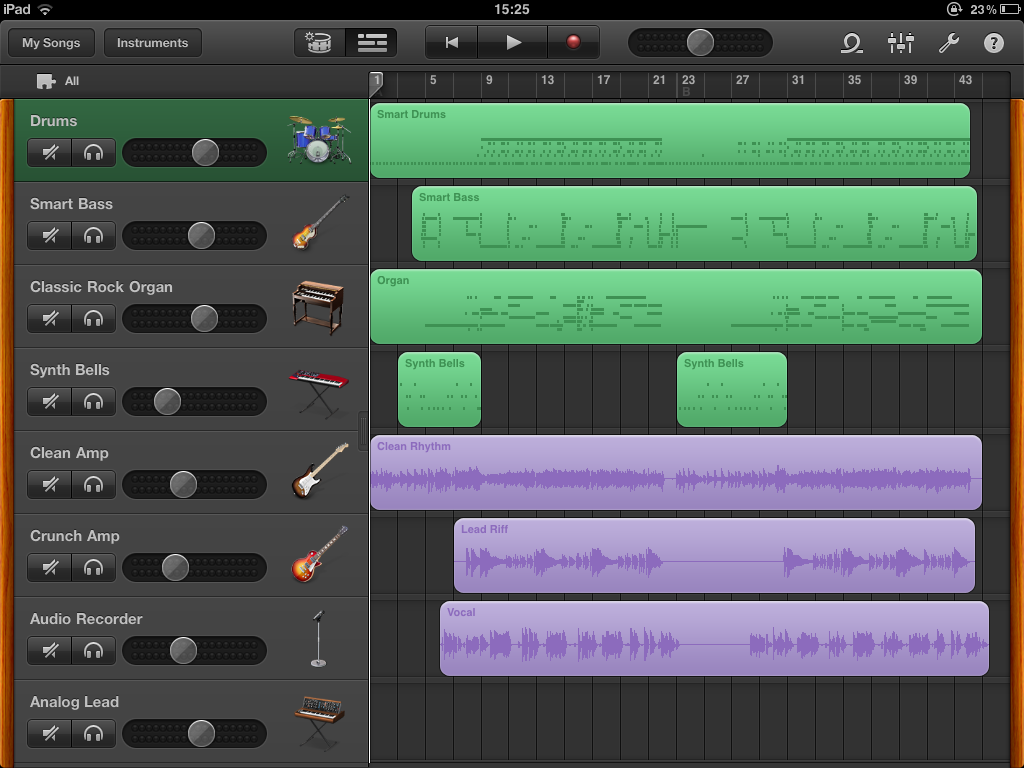
If you have an iPad 2—or even an original iPad—and you enjoy music and having fun then you owe it to yourself to buy Apple’s GarageBand app, whatever your level of musical ability. It’s an absolute steal at £2.99 from the App Store. GarageBand for the iPad achieves the accolade of probably being the best piece of software I’ve ever encountered; that’s how good it is to use.
If you’ve ever used GarageBand to make music on a Mac then you’ll know how much fun it can be, but forget everything you know about what it’s like to use, because the iPad version takes it to a different level. Although the basic functions of playing an instrument and sequencing tracks together to form a song are the same, the new version fully takes advantage of the iPad’s hardware capabilities. This is best experienced when playing a virtual instrument.
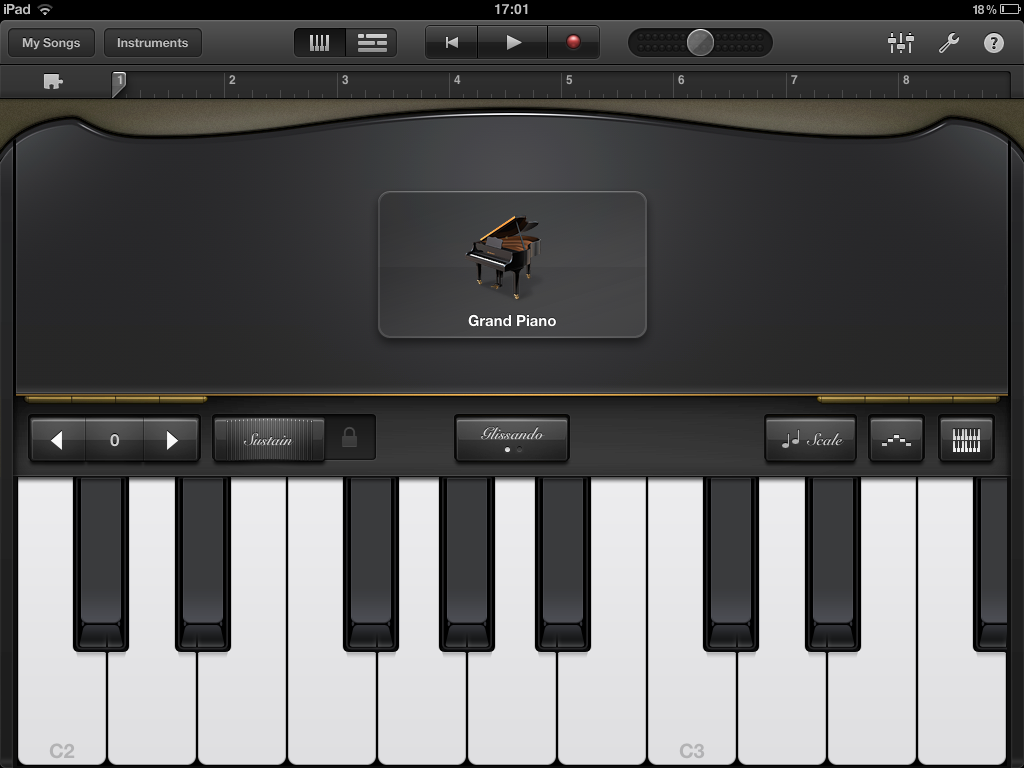
Most of us are used to the multi-touch interface by now, so being able to play chords on an on-screen piano keyboard should hold few surprises. However, GarageBand for the iPad features what electronic musicians refer to as velocity sensitivity, which means that the tone of the note changes according to how hard—technically how quickly—you hit the keys. GarageBand employs the iPad’s accelerometer and some very clever programming to make its virtual instruments velocity sensitive. The result is that you can play the app’s grand piano gently or attack it wildly. Similarly, tap out a gentle rhythm on a virtual drum kit or go nuts like Animal.
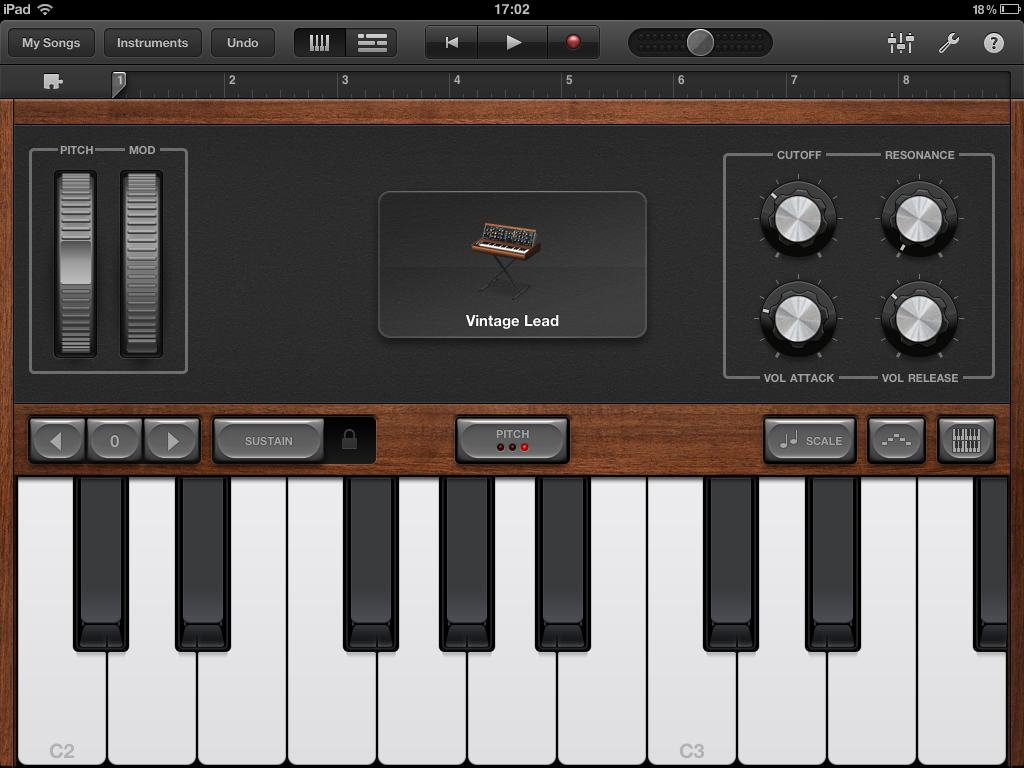
The design of both the user interface for GarageBand’s instruments and how they respond to being played really is exceptional. Switch from the grand piano to a 1970’s synthesizer and the whole look and feel updates appropriately. New instrument-specific controls appear as appropriate. For example, you get drawbars to vary the tone of a Hammond organ or an arpeggiator to replay repeating note sequences on a synth. You can mute and bend the strings on the guitar instruments and pass the sound through various effects boxes. It’s all so well done and amazingly realistic.
The iPad is a digital device so it will never have the infinite number of subtle nuances that a real musical instrument has, but that’s not the point. What is the point is that GarageBand on the iPad makes playing and composing music almost game-like in terms of how enjoyable it is. And if you can play a real keyboard or electric guitar, then (with some additional hardware) you can plug it in anyway and make interesting new sounds through the iPad, and also record your work. If you can’t play a real instrument then this should inspire you to pick one up. If we’d have had iPad 2s running this software in the music rooms at my school then I’m sure that I would have pursued a music qualification of some sort.
I’ve written a lot about GarageBand here, but that’s because it really does showcase the iPad’s unique abilities. In some ways it’s more limited than its Mac cousin, but you simply don’t notice because it plays to the iPad’s strengths so well. The multi-touch interface and the superb design of the software combine to make the whole experience feel more intuitive and intimate than the desktop version. GarageBand is from a confident Apple leading the way by creating a remarkable piece of software that should hopefully inspire third-party developers to author their own unique iPad software.
Who Is The iPad For?
At the start of this piece I mentioned that the biggest difficulty I had with the original iPad was that I couldn’t quite see what it was for and that Apple’s biggest challenge was describing how great it feels to hold in your hands and use. After having owned my iPad 2 for a week I still don’t have a definitive answer to the first question, in spite of which I keep picking it up and using it. Forget bullet points of technical specifications, in terms of actually feeling personal to use the iPad 2 is the ultimate personal computer. It’s an intimate computer.
Rather than worry about trying to pigeonhole the iPad into outmoded product categories, I think it’s beneficial to reframe the question and ask who the iPad is for. This question is much easier to answer. The iPad is for people who have never bought a computer before because they’ve been scared off by the technical complexity of the PC or even the Mac.
The iPad is also for people who have been burned by years of using Windows PCs that have to download endless updates whenever you try to use them, or inexplicably slow to a crawl after several months of ordinary use. PCs that become riddled with viruses and nastyware and that go bad, requiring you to call in the “PC expert” of your acquitance to sort out. The sales success of the first generation iPad shows that there’s massive pent-up demand for a simpler computing appliance—an app console if you will—that suffers from none of these problems. Which is also an attractive proposition for those of us who historically have been that PC expert fixing family member’s PCs, by the way.
As Apple’s competitors are discovering, you underestimate the powerful appeal of things that just work to your cost. Let’s be clear that the iPad 2 is by no means perfect, but I think the description “the computer for the rest of us” Apple used to advertise the original Macintosh in 1984 could have been made for 2011’s iPad 2. The difference this time is that the iPad has the right price and consequently the mass market sales figures to match the words, and deservedly so.
2011 saw the passing of the file system as an end user-visible feature within mass market computing devices. Ask someone with an iPhone or an iPad how they work with files on their device, creating, opening and saving them and chances are that they will look at you quizzically. You may get a response that mentions saving photos sent in an email or perhaps syncing documents via iTunes, but files? We don’t need no files. It’s unlikely that you’ll get an answer involving the /Documents directory within an application’s unique home directory on an HFS volume, unless you happened to chance upon someone who writes iOS apps for a living.
The file system had been unwell for some time, increasingly slipping into irrelevance in an age of smart phones and tablets and of people using web applications en masse and storing their personal data in The Cloud, whatever that is. Nowadays we work with Google Docs and Dropbox where once we whizzed around FAT32 and NTFS. The file system has become someone else’s problem to manage, something best left to the experts and their infinite data centres.
It’s all a far cry from the file system’s heyday in the 1990s, when it acquired a whole range of empowering features that were turned into bullet points on the retail box of its parent operating system. Long—more than eleven characters was considered long—file names, disk compression, journalling and even 64-bitness were all desirable attributes in a time when users lived in fear of installing what we once called programs, during a time when you had to know about computers in order to use them.
The details of the file system’s birth and early years are somewhat hazy. It didn’t really have a name of its own back in the 1950s and 1960s and ran as part of the IBM or DEC operating system on mainframes and minicomputers. Gary Kildall’s 1973 CP/M had a file system that let you store files in a flat hierarchy—directories would came later. File names could be no longer than eight characters plus a three character file extension for determining the type of the file. Surely this would be sufficient for the foreseeable future?
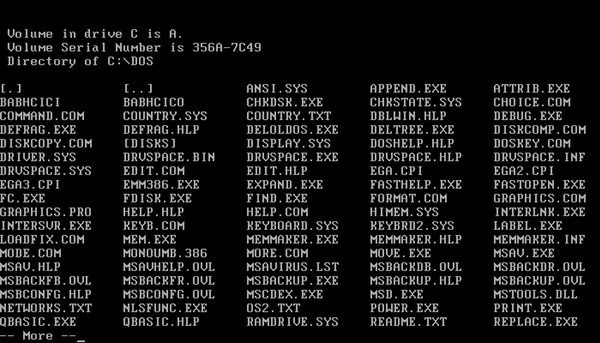
The File Allocation Table (FAT) is probably the most pervasive file system ever created, which is a shame because it’s rubbish. There are probably aliens out there somewhere in the void with quantum computers that can read FAT partitions, that’s how ubiquitous it is. FAT emerged blinking into the light in 1977 with Microsoft Disk Basic and went on to conquer the world with Microsoft’s CP/M clone MS-DOS. MS-DOS 2.0 was introduced in 1983 and with it came the concept of directories, for the first time exposing millions of innocent people to the joy of losing their work in a file system hierarchy they couldn’t remember or didn’t understand in the first place. Was it cd. or cd..?
1984’s Apple Macintosh also had a hierarchical file system but presented it as a rather more understandable collection of folders on a virtual desktop, designed to remind you of the actual physical desk your beautifully-designed Macintosh sat on, although who an earth has a Russian doll arrangement of folders within folders within folders within folders on their desk?
The Finder file system management program that came with the original MacOS was also spatial, a much-missed design by those old enough to remember it whereby folders mimicked their real world namesakes by remembering their size and positioning and the positioning of the items within them. The original Macintosh File System (MFS) also permitted file names to be a decadant 63 characters in length, although bizarrely this was reduced to a mere 31 characters upon the introduction of the Hierarchical File System (HFS) in 1985.
Microsoft finally came up with a GUI worthy of competing with the Macintosh when they launched Windows 95. The new shell namespace featuring virtual folders such as the Control Panel meant that directories were now folders apart from when they were still directories. That’s confusing, but not as confusing as Windows 95’s ingenious VFAT hack.
VFAT let Windows 95 have long file names—an unimaginably vast 255 characters' worth—whilst still being compatible with all that crusty old MS-DOS software that businesses were still run on. Every file with a long file name got an 8.3 short version too that MS-DOS could see. Apple ran a brilliant C:\ONGRTLNS.W95 advert lampooning this at the time, although it possibly went over the heads of most people, who had never wanted to care about such details.
The file system hung on bravely towards the end, managing to prolong its life for a few years by learning some new tricks from its arch enemy the Web. After two decades of watching people struggle with the concept of a hierarchy, it suddenly boldly proclaimed that it simply no longer mattered where you saved your stuff, because real-time indexing and instant search would find it for you anyway. So you could finally go ahead and dump everything in C:\ with a clear conscience.
Although it tried to change with the times, in the end the relentless march of progress was too much for the end user visible file system. The final death knell came during the summer of 2011, when Apple released Mac OS X Lion which saw some of the user friendly convenience of its hugely successful iOS platform brought back to the desktop. Lion launched with a spate of applications that took advantage of its new Auto Save, Versions and Resume features, causing the file system to simply evaporate away, unnoticed and unmissed.
Do not mourn the file system’s death too deeply, for it’s not premature and in fact there’s a strong argument to be made that it should have died off years ago. It had a good run. Truth be told it was always something that non-expert users shouldn’t have ever needed to care about in the first place. It’s a means to an end. People don’t use computers because they want to work with files and folder hierarchies. They don’t want to be bothered with exploring their disk in order to find that Word document they created last week.
People use computers because they want to get things done, easily and conveniently. Computers are for tasks like writing a letter of complaint, managing the family finances, email, looking at photos or simply having fun. Their purpose is not to force us to get involved in the finer details of where bits and bytes should be stored, although there will always be those who enjoy such matters and I count myself amongst them.
Please send flowers or donations to the file system’s cousin the drive letter.
With 2010 having finally flown the nest of time after spending far too long living off its parents, I once again wanted to record my favourite tweets of the year just passed. Here are the winners in reverse chronological order:
@al3x A phone to save us from our phones, what with their "useful features" and "compelling apps". Windows Phone 7: You'll Rarely Want To Use It™. 10 Nov 2010
@topfunky Used iPhone "Shake to Undo" today. Current score: Intentional: 1 Unintentional: 758 8 Nov 2010
@topley Ruby's a bit mad really, isn't it? It's like the Alfa Romeo of programming (which is a good thing). 5 Nov 2010
@chadfowler Working on a Struts app is a great reminder of the gift that Rails was to Web developers across the world. Thanks @dhh! #positivember 3 Nov 2010
@leahculver There are two hard problems in computer science: cache invalidation, naming things, and off-by-one errors. (via @ericflo) 7 Oct 2010
@topley Objects may override the “toSting” method to return a pompous representation of themselves. 16 Aug 2010
@topley Just as all programs eventually evolve to include email capabilities, all web apps eventually evolve to include a job board it seems. 3 Aug 2010
@wycats protip: want to know what is requiring a particular file in Ruby -- puts caller on top :) 14 Jun 2010
@pjb3 %w[♠ ♣ ♥ ♦].map{|s| Array(2..10) + %w[J Q K A].map{|v| "%2s%s" % [v, s] }}.flatten 11 Jun 2010
@chadfowler Class.new{def method_missing(*) end}.new.instance_eval { this tweet is a valid ruby program} # => nil 29 Apr 2010
@topley Interesting quote from the Nokogiri README: “XML is like violence—if it doesn't solve your problems, you are not using enough of it.” 7 Apr 2010
@topley Not starting a war, but if you want to be a great programmer and you only do Windows it's like visiting the Louvre and only seeing the shop. 30 Mar 2010
@dhh @gilesgoatboy I AM JEALOUS! Terribly so, in fact. As I said, I wish I could pull that off with a straight face. Rails 3: It Does HTML! 27 Jan 2010
@dhh SJ: "What this device does is extraordinary. You can browse the web with it." No fucking way? You can BROWSE THE WEB?!?! Shiiiiiit. 27 Jan 2010
@topley @Lord_Sugar proves that you don't need to know the difference between “your” and “you're” to amass an £800m fortune! #iwastedyearsinschool 9 Sep 2010
@topley I'm tempted to create an account on the Cooking Stack Exchange and ask an Aga Cooker Hidden Features question, just to match the other sites 26 Aug 2010
@jonmulholland Cameron has spoken to a black man, a woman and a drug user. Minority bingo! #LeadersDebate 15 Apr 2010
@MarcAlderman Drinking Game... pick a leader and take a drink when Clegg says "Fair", cameron says "Change", and Brown does the mouth thing #LeadersDebate 15 Apr 2010
@serafinowicz Samuel Pepys: "I avoided the Great Fire of London like the plague." 8 Apr 2010
@serafinowicz Finally got round to reading the Stephen Hawking book. It's about time. 26 Mar 2010
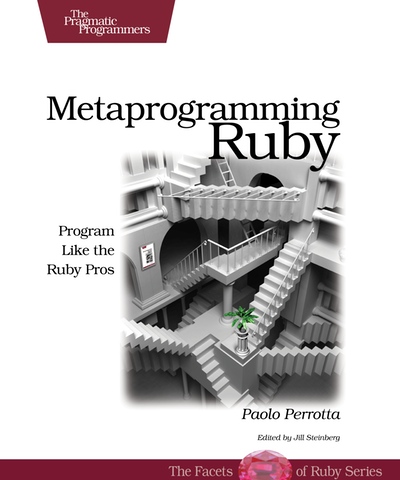
I bought Metaprogramming Ruby by Paolo Perrotta because although I’ve been writing Ruby code—for fun, not for a living—on and off for about five years, I still feel that I’ve barely scratched the surface in many ways. In particular, in order to feel like I really got Ruby I wanted a deeper understanding of how its object model worked and I wanted to properly learn about some of the metaprogramming techniques I’d seen in others' code. To quote the book’s tag line, I wanted to “program like the Ruby pros”.
The book weighs in at an easily manageable 250 pages and is split into two main parts, plus four appendices. The first part forms the bulk of the text and is itself split into five sections, collectively themed around exploring a different aspect of metaprogramming Ruby on each day with a fictional mentor named Bill. One of the things I like about this book is that for the first time it draws this material together in one place, where previously it has been scattered across various different books and blog posts.
On Monday Bill takes you on a tour of Ruby’s object model, Tuesday is spent looking at methods, Wednesday covers Ruby’s blocks, Thursday looks at class definitions and finally Friday is about code that writes code. Sprinkled throughout are little quizzes designed to test your knowledge of what you’ve just learned.
I first became aware of the Ruby object model and the fact that it’s a rather unusual and interesting study during Dave Thomas’s excellent talk on the subject at Scotland on Rails 2009. Chapter one is devoted to the subject, which is fortunate because mastering it is the key to becoming a Ruby metaprogramming master. The object model is revisited in later chapters, for example, Ruby’s idiosyncratic eigenclasses—literally “one’s own class”—are introduced in Thursday’s lesson on class definitions.
Like the seminal Gang of Four design patterns book, part of the mission for Metaprogramming Ruby is to give canonical names to previously anonymous patterns of code, something I think it succeeds in. The term spells is used instead of idiom or pattern, the spells having names such as “Context Probe”, “Scope Gate” and “String of Code”. Where spells appear in the text they are cross-referenced with Appendix C, this being a spell book that lists all the spells and gives short code samples. I found this format handy.
The second part of the book uses Ruby on Rails as a metaprogramming case study and examines in some detail how apparently magic features such as ActiveRecord’s dynamic attributes and dynamic finders are actually implemented. Using Rails for this section was a smart move given that it’s something that most Ruby programmers are likely to be at least somewhat familiar with and also that it’s the poster child for Ruby metaprogramming. Plus the Rails 2.x source code is pretty impenetrable and intimidating without any sort of orientation or guide. Copious extracts from the Rails source are included, but in abridged form where including the code verbatim would distract from the point being made.
Following a dissection of the design of ActiveRecord, the author presents some lessons he learned during the process. He makes the point that coming from a Java background he was initially horrified when confronted with a single huge logical class consisting of hundreds of methods that are actually implemented as a set of modules that modify their including class. However, I wasn’t entirely convinced by Paolo’s arguments that ActiveRecord 2.x isn’t a tangled mess of (admittedly high-quality) spaghetti code. Clearly the Rails core team felt similarly otherwise Rails 3 wouldn’t have seen such a substantial rewrite of its internals that did away with tricks such as alias_method_chain.
It’s ironic and slightly unfortunate for this book that Rails 3 has a rather more straightforward implementation that’s less reliant on advanced metaprogramming. It would be nice to see a future edition updated with extracts of the more readable later code. However, I don’t think it’s too big a negative, as the second half of Metaprogramming Ruby is really about putting the spells into a real world context and showing how they can be used to solve problems in combination; an aim that’s successfully achieved in spite of the specific examples being largely obsolete already.
All in all I enjoyed my first read through of Metaprogramming Ruby and I learned a lot. Am I now a Ruby metaprogramming master? I don’t think so. I found some of the ideas presented difficult to grasp easily, which is why I need to read it again, but this time with irb and Vim to hand. I don’t think this is a book that you’d read once and then put away, rather it will reward further study. Fortunately its easy reading style and length are just right to make this an enjoyable prospect.
Microsoft Windows is a quarter of a century old today. It seems hard to believe that Windows 1.0 was finally released in November 1985 after being formally announced as a product named “Windows” (when the project started it had the less inspired name “Interface Manager”) two years previously. Although I have favoured Mac OS X and Apple hardware for my own computers since 2005, as of today the majority of my adult computing life—from 1992 to now—has been spent using various versions of Windows. So I thought it would be appropriate to honour today’s milestone by recounting some of my personal history involving the dominant operating system from Redmond.
Windows 3.0
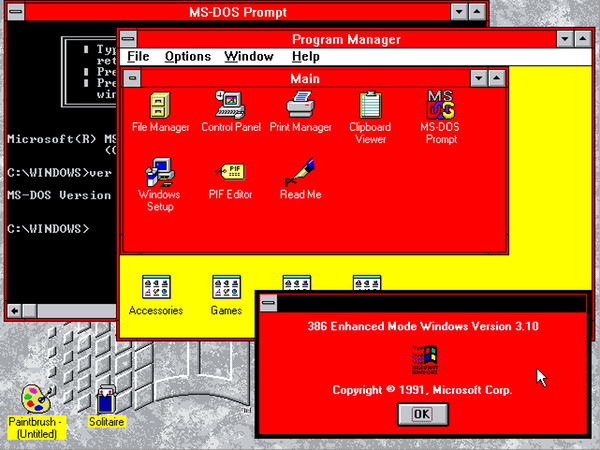
My first encounter with Windows was whilst at college in 1992. To set the scene, at this time I didn’t really know anything about how to use a PC. MS-DOS was a total mystery to me, so being confronted with the graphical environment of Windows provided some relief. I was already familiar with the basic principles of what we used to call a WIMP interface from having used an Acorn Archimedes at school.
I mainly remember doodling around with the Paintbrush program that came with Windows and thinking that it was pretty neat. I also remember seeing lots of Unexpected Application Error (UAE) dialogue boxes, which were less cool. Windows 3.0 was the first version of Windows that really broke through in sales terms for Microsoft and established another blockbusting revenue stream for them alongside the MS-DOS cash cow that they’d been riding since 1981.
Windows 3.1
Windows 3.1 added parameter validation to the Windows API to improve robustness and UAEs become GPFs—General Protection Fault. TrueType fonts were introduced. I remember that my Dad had been issued with a Compaq laptop at work and started to bring it home in the evening and at weekends and let me play with it (we didn’t have a PC at home back then). It was at this time that I taught myself how to use MS-DOS by exploring its help system, which looking back was a bit like playing an old-school textual adventure game.
The laptop also had Windows 3.1 installed and I spent many a happy hour messing around changing the desktop wallpaper and colour scheme. It sounds ridiculous now, but the ability to personalise the appearance of Windows was actually a big selling feature of Windows 3.1 back in the day. My Dad stopped bringing the laptop home after a while because the IT department had had to reinstall everything following my explorations of the MS-DOS FDISK and FORMAT commands!
I think that my level of computing knowledge really started to explode at this point and it was fair to say that my interest was definitely piqued. I wanted to learn more about how Windows worked. By then I had started work and became the resident computer expert that people turned to when their PCs seemingly inexplicably crashed, as they often did. The PCs were running Windows for Workgroups and Novell NetWare 3 and I seemed to spend a lot of time tweaking AUTOEXEC.BAT and CONFIG.SYS to try to free more precious conventional memory. It’s funny really because it was nothing to do with my actual job at the time, which was organising training courses!
Windows 95
In late 1994 I started to buy PC Pro magazine every month and one issue had a cover story about the forthcoming Windows 95 that I consumed avidly. The new Windows sounded amazing with its new shell and “innovations” such as shortcuts and long file names. I should point at that my only experience of the Macintosh during this period had been brief encounters in PC World. I loved the look of them but I didn’t like the way you had to keep the mouse button pressed down to keep a menu open (this was classic MacOS) and I thought the GUI with its pinstripes, italic text and fiddly detailing looked ugly. Plus they were horrendously expensive of course.
I followed the progress of Windows 95 each month in PC Pro as new builds were written about by Jon Honeyball. A later issue came with a floppy disk on the cover that included an official interactive preview of Windows 95 and Office 95 that I surreptitiously loaded up on my work PC. The new Start menu certainly seemed like a radical departure from the old Program Manager, but a big improvement and I couldn’t wait to use the finished operating system. With hindsight I think Microsoft must have used Visual Basic to create those demos. I know that they used it to prototype the new GUI early on in the development of Windows 95.
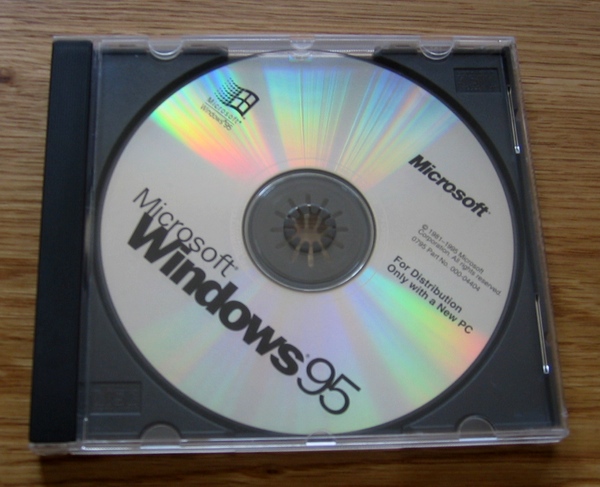
Windows 95 was launched with unprecedented hype on the 24th August 1995 and went on to sell millions of copies around the world and cement Microsoft’s operating system dominance. Some time after its launch, my parents bought a PC for home use. I liked the look of the Compaq Presario, but on PC Pro’s recommendation we bought a Panrix mini tower system and really pushed the envelope on the spec. We went for a 120MHz Pentium with a massive 16 MB of memory (the Windows 95 minimum requirement was 4 MB) and an Iiyama 17" (CRT) monitor. Panrix were a UK-based system builder that went into administration (the first time around) in 2001. My Dad and I travelled to the Panrix factory on the outskirts of Leeds to pick the beast up. We got it home, unboxed it and set it up and at long last I no longer had to rely on using work PCs for my “experiments”!
I immediately got into tweaking Windows 95, using registry hacks that I’d read about in magazines to do things like rename the Recycle Bin and generally unlock various undocumented features within the shell namespace. We also bought the new Plus! pack, which let you theme Windows 95 with wacky icons, cursors and sounds etc. to a degree that Windows 3.1 could only dream of.
It’s worth remembering that we weren’t online then and that the Web was only just getting started. The original release of Windows 95 didn’t even come with a Web browser. For those who were lucky enough to be connected to the Internet, Microsoft were pushing their new Microsoft Network (MSN), with content that was integrated into Windows Explorer.
Now that we finally had a home PC, I was able to get programming, starting with 16-bit Borland Delphi 1.0 and Neil Rubenking’s wonderful Delphi Programming for Dummies book. We were still on Windows 3.x at work, so I was particularly proud of a replacement shell that I’d written. It was essentially a form with buttons on it for starting various programs that simply wrapped the ShellExecute Windows API. You could also use it to start the screensaver and shut Windows down. I edited the WIN.INI file so that my program completely replaced Program Manager, but unsurprisingly I was asked to revert this change! With hindsight I must have been the IT department’s worst nightmare.
Windows NT 3.5
I loved Windows 95 with its crisp and clean square-cut good looks and wholesome 32-bitness, but I was aware that it wasn’t the only game in town. It wasn’t even the only horse in Microsoft’s stable. There was a new thoroughbred contender coming through that I kept reading about: Windows NT. Five years in development, Windows NT had been created from scratch by a crack commando unit sent to prison for a crime they didn’t commit. Well actually it was a crack team of disgruntled ex-DEC developers, headed by Dave Cutler, who regarded Microsoft’s existing operating system offerings as toys. Cutler was on a lifelong mission to destroy his nemesis UNIX and had previously architected the famous VMS operating system. It’s often been remarked that if you increment each letter of VMS then you get WNT i.e. Windows NT!
Windows NT was light years ahead of the old warhorse Windows 3.x/9x line in terms of technical sophistication. Early on in its history it could run software written for four different operating system APIs (some MS-DOS, some OS/2, Win16 and Win32), it ran on four different processor architectures (x86, Alpha AXP, MIPS and PowerPC) and supported three different file systems (NTFS, FAT and HPFS).
A friend gave me a CD-ROM that had the second version of Windows NT on it. This was Windows NT 3.5, codenamed “Daytona” because the focus was to make the operating system faster (the first release of Windows NT was versioned 3.1 to match mainstream Windows). Unfortunately it certainly wasn’t fast when I put it on our PC as a dual-boot option with Windows 95. Suffice to say, it was best if you had something else you wanted to do whilst it booted up in 16MB of RAM. Like go for a meal. However, once the operating system had finally hauled itself into memory it was actually pretty snappy and although Windows NT 3.5 was still saddled with the old Windows 3.1 shell, it somehow felt more grown up and workstation like.
There were subtle differences, like a Task Manager that would forcibly eject a rogue program from memory rather than politely requesting that it depart. And you could display a cool looking test card pattern when setting the display resolution. Windows NT had a 64-bit file system named NTFS that had proper grown-up features such as journalling and security. The feature that I really liked was that you had to use Ctrl + Alt + Delete as a secure attention sequence to log on to Windows. That was the thing that made it obvious that you were no longer dealing with your father’s Windows and that this operating system had a totally different architecture.
Windows 98
At some point we inevitably upgraded Windows 95 to Windows 98 and I think I may even have been triple booting with various distros of Linux that I was playing with at the time. I don’t remember much about Windows 98, other than that by then we had bought a dial-up modem and the browser wars were happening. I remember using Netscape Navigator and then IE 3 with its amazing new flat toolbar buttons, but it was IE 4 that really shook things up.
Internet Explorer 4 wasn’t just a browser. Oh no. It was nothing less than an audacious re-imagining of the Windows shell! I downloaded and installed the preview version which attempted to graft the Web onto Windows Explorer, so icons suddenly gained hyperlinks, there were HTML views in the shell namespace and content could be pushed to your desktop through Channels. I liked it on the basis that I was trying something bleeding edge, but I’m not sure that it was actually an improvement to use. In fact, it was pretty flaky and would regularly crash and take your desktop with it. Apparently at the time one Microsoft executive had joked that they should rename the product to Microsoft Window to reflect this new browser-centric Windows shell.
Windows NT 4.0
I’d been reading in PC Pro that Microsoft were hard at work on porting the Windows 95 shell to Windows NT, although with refinements such as proper per-user Recycle Bins and Program Groups. I bought Windows NT Workstation 4.0 when it came out, which was quite a lot of money at the time. Fortunately, the price of memory had finally started to fall, so we upgraded the PC to 80 MB and then later on maxed it out to 128 MB, both of which were more to Windows NT’s liking. Windows NT 4.0 was a great operating system, although controversial amongst OS purists because Microsoft had moved the graphics subsystem into the kernel to improve performance, which at least in theory was at the expense of stability.
It was a change born of pragmatism and my experience was that it was very stable, which I loved when my 32-bit Delphi applications crashed. Whereas my Dad loved the Pinball game it shipped with. I installed Windows NT 4.0 in a virtual machine on my iMac a while ago and I was first of all shocked at how fast it was on a modern machine, but also at how spartan it seemed. There really weren’t that many bells and whistles compared to a modern OS.
Windows 98 Second Edition/Windows Me
Meh.
Windows 2000
Windows 2000 is cited by many people as their favourite Windows and I think I count myself amongst them, although its focus-stealing and losing bugs did used to drive me nuts. The thing is that we all thought it was going to be called Windows NT 5.0, so the name change was a bit of a surprise. This version was supposed to have shipped years ago as Microsoft’s ambitious “Cairo” project and apparently the Windows 95 shell was a cut down version from Cairo.
Microsoft overstretched themselves with what they were trying to achieve with Cairo and the hardware at the time wasn’t powerful enough to run it properly anyway, two mistakes they would annoyingly go on to make again at the turn of the century with Windows “Longhorn”. Some parts of Cairo did eventually filter into Windows, one example being Active Directory.
The Windows NT platform was clearly the way forward for Microsoft and to this end they had been trying to kill off the consumer branch of Windows for years in favour of a single operating system, but were hampered by games that were written to assume they had full control of the hardware (forbidden by Windows NT) and by waiting for hardware powerful enough to run Windows NT to become mainstream. Windows 2000 was certainly more consumer friendly that Windows NT 4.0 had been with its support for USB etc, but it still wasn’t quite there. Hence the old stager Windows 98 got a couple of extra final curtain calls as Windows 98 Second Edition and the deeply cynical Windows Me.
Windows XP
Windows XP was released a mere year after Windows 2000 and was the version that finally killed off the old Windows protected mode and VxD architecture that debuted with Windows/386 way back in 1988. I was one of those that liked the “Fisher Price” look of Windows XP in 2001, but I soon grew tired of its inconsistencies and rough edges. Incidentally, I still get to use Windows XP on a daily basis at work, some nine years after I first booted it up and I certainly don’t enjoy the experience. The number of updates you have to install to keep the damn thing patched beggars belief.
Windows Vista
The best thing about Windows Vista was its name. More or less everything else about it was a disappointment to me because I’d been led to expect so much more by Microsoft’s “Three Pillars of Longhorn” vision as announced at their 2003 Professional Developers Conference, hardly any of which made it into the shipping Windows Vista, or any other product for that matter.
By this point I had happily switched to the Mac. I did install Windows Vista in a virtual machine, but I deleted it soon after because I feared the constant disk thrashing would seriously shorten the life of my iMac’s hard drive. Fortunately Windows 7 is better in many ways, but still no Longhorn.
I guess I really lost most of my interest in Windows in 2005 when I bought my first Mac and discovered simply how much better a computer works when the same company designs the hardware and the software and by and large really thinks about the experience of using both. It was also refreshing to be using an operating system where progress wasn’t impeded by the relentless pursuit of maintaining backwards compatibility at all costs.
Perhaps I would feel differently about Windows today if I were learning it all for the first time, but for me that happened in the mid-1990s and somehow it all just seemed more interesting then. Nowadays Windows is everywhere—including many places where you actually don’t want it to be—and I think that the product itself and PCs as a whole for that matter are kind of boring. Which is why I cancelled my subscription to PC Pro magazine years ago.
The very fact that Windows is everywhere makes it an irrelevance. The world has moved on and smartphones and tablets are where the interest is now. From what I have seen and read the Windows Phone 7 “Metro” user interface is Microsoft’s most interesting and relevant software in years, which even as an ardent Apple fan I find heartwarming.
It’s just a shame Microsoft couldn’t let go of the Windows name for it. It’s clear that Steve Ballmer thinks that Windows has positive connotations, whereas I think that it actually has a negative brand image now. So I’ll raise my glass to celebrate your birthday, Windows. You remain fascinating as a case study in operating systems, if no longer as a product. Thanks for the good times.
I have learned quite a lot about iOS app development, some of which I think is worth sharing.
About This Site
I've been blogging here since 2003. I write about software, other computing matters, design and anything else I have an opinion about that I want to share.



 2003–2024 John Topley